PULLY - GYM LOG & PLAN TRACKER
The workout tracker and gym log built for progress.
Train with a plan and ask Buddy AI how you're doing.
PPL, Full Body, Upper/Lower or your own split. Build your plan once, log sets in 2 taps, and your data starts working for you: progression charts, a muscle map and 350+ exercises with animations. No spreadsheets. No retyping. Ask Buddy AI what to change - it knows your weights and progress.

Free download
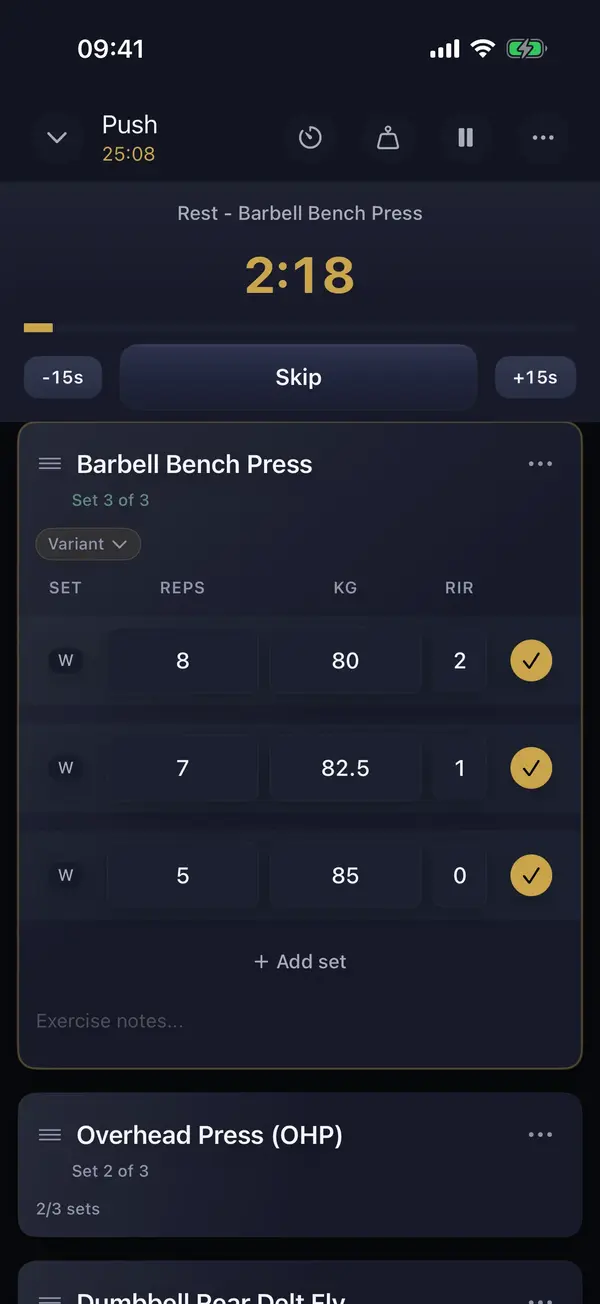
Speed. Control. Insight.
Speed
Fewer taps, less retyping, less figuring out what to do today. Weights from your last session are already there, the rest timer starts on its own, and logging doesn't interrupt your training.
Control
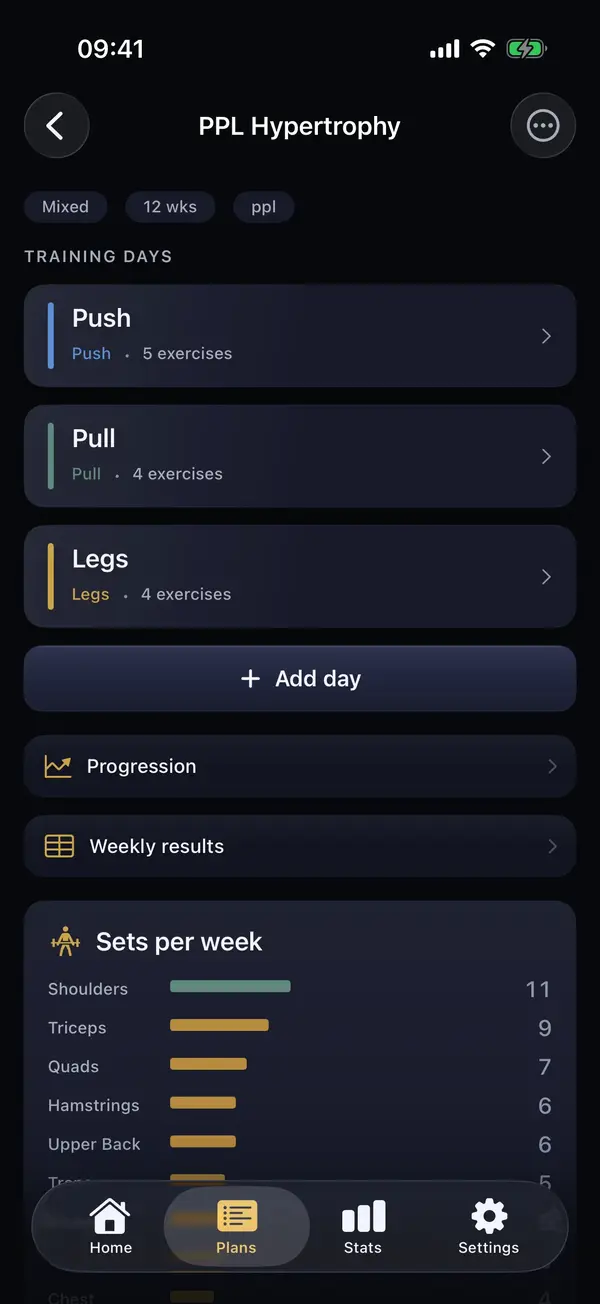
The app adapts to your plan, not the other way around. Split, days, exercises, variants, RIR, quick plan changes, templates alongside plans.
Insight
Week-over-week comparison, records, muscle map and per-exercise progression. Data that helps you decide, not just numbers on a screen.
HOW IT WORKS
Not another workout tracker. A gym planner that runs your plan.
Build your plan the way you actually train
PPL, Full Body, Upper/Lower or your own layout. Add days, exercises, targets, rest periods, and variants, or build the plan in conversation with Buddy AI. You don't bend your training plan to fit the app. The app keeps up with your training logic.
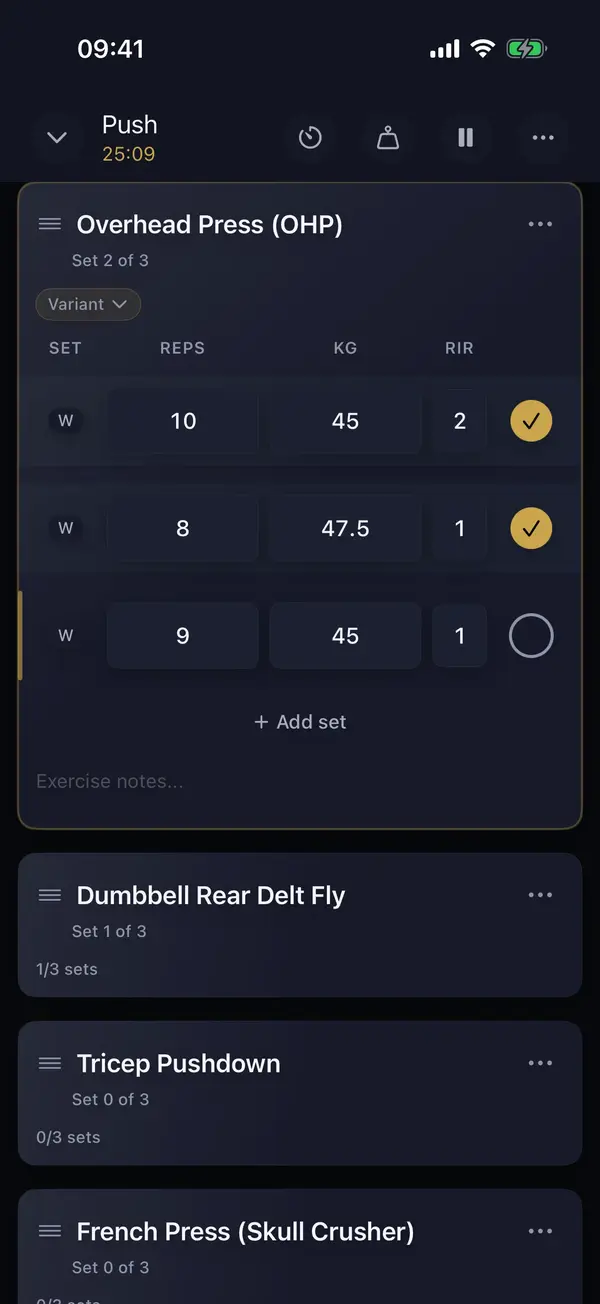
Log without breaking your session
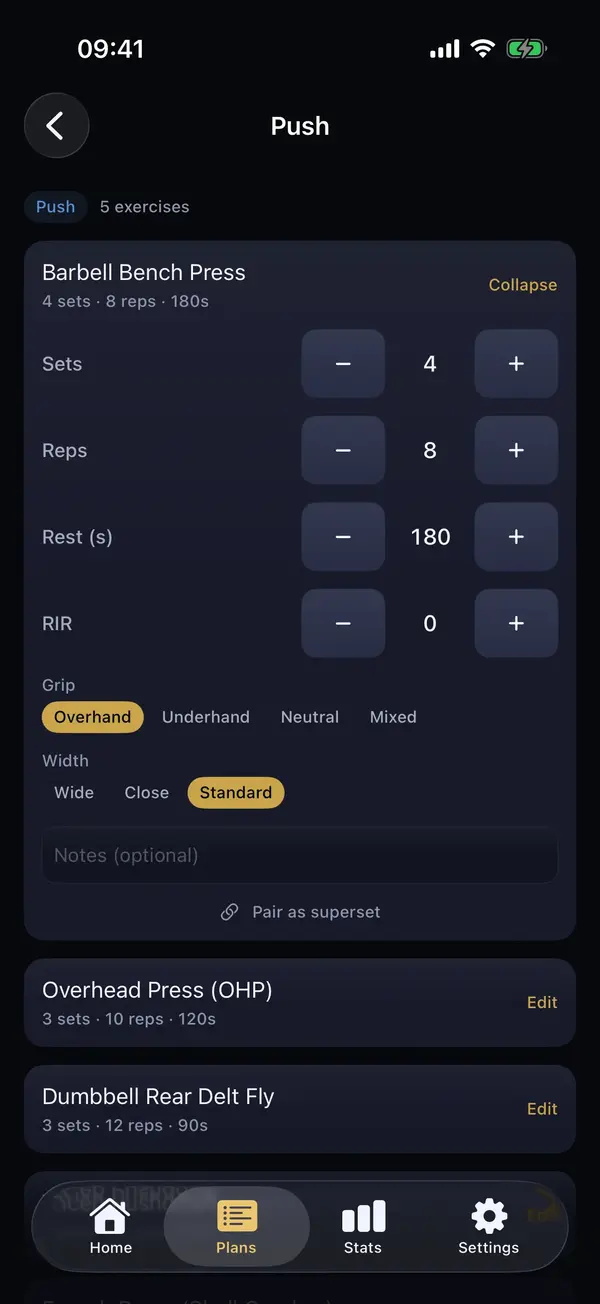
Open your workout log and immediately see what to do. Weights from your last session are already filled in per exercise variant. Sets go in with 2 taps, the rest timer starts on its own, and RIR is right there instead of hidden somewhere in a menu.
See if the plan is actually working
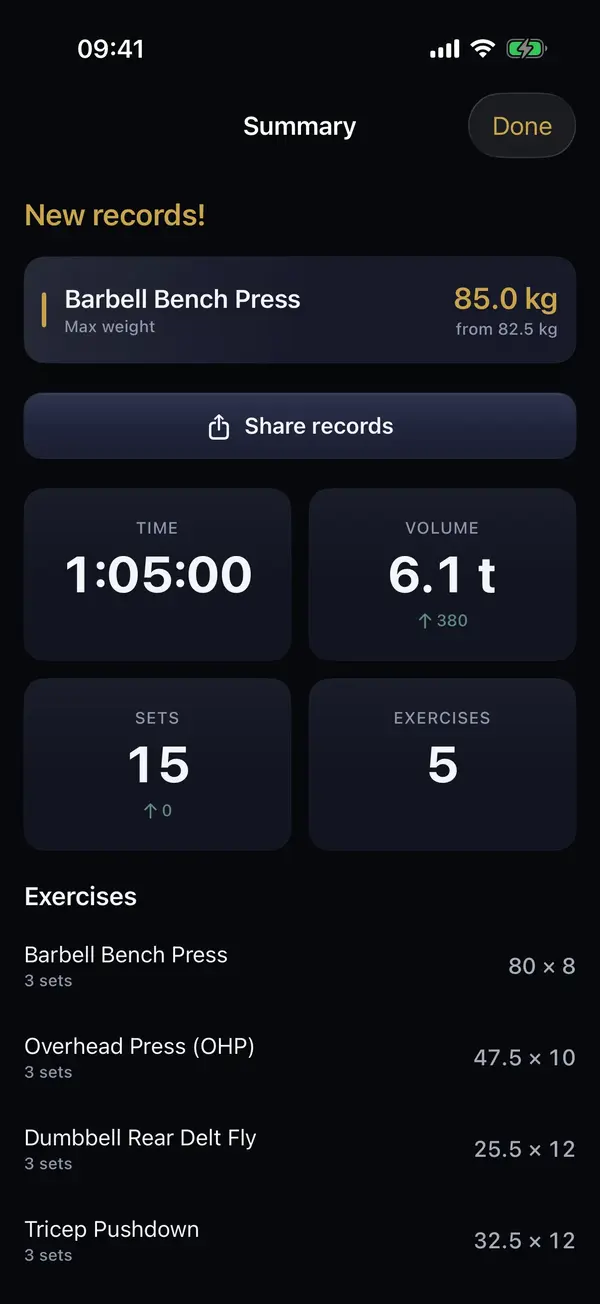
After the workout you see records and a comparison with your previous session. In stats: progression, muscle map and weekly volume.
Buddy AI
Buddy AI - a training partner that knows your numbers
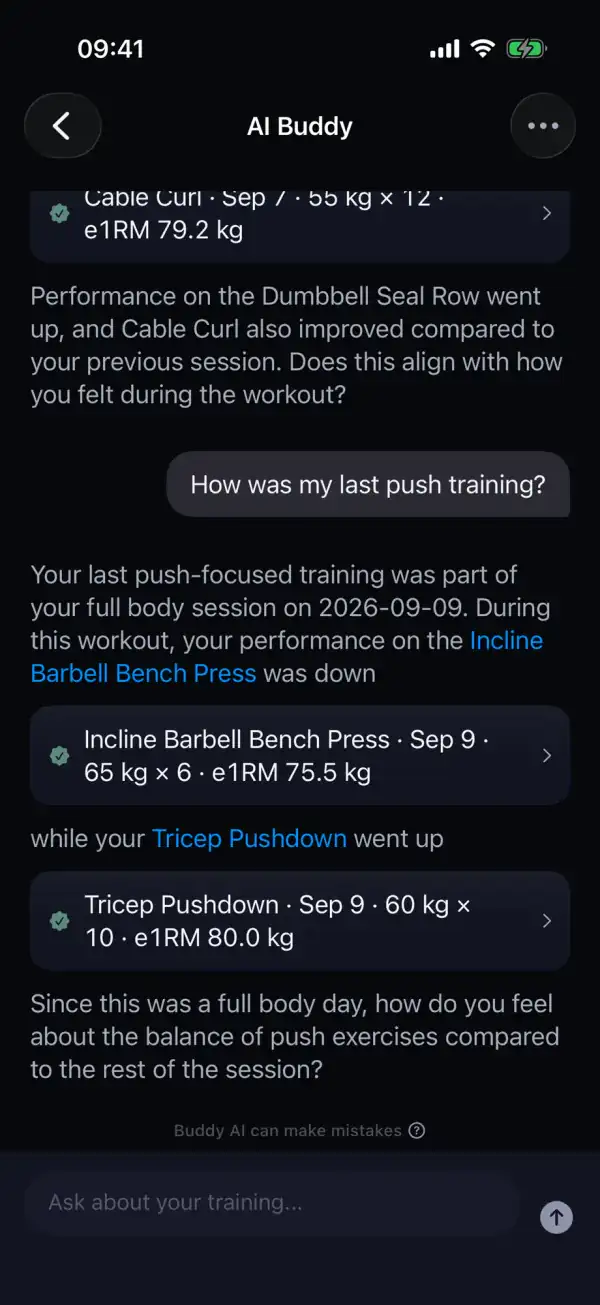
Buddy AI is a training partner inside the Pully iPhone app. It reads your logged workouts and plan, so it answers with your own numbers, not generic advice.
Ask how you're doing
Ask about your last session or your progress on an exercise, and the answer is built on your own sets.
“How was my last push training?”
Build a plan in conversation
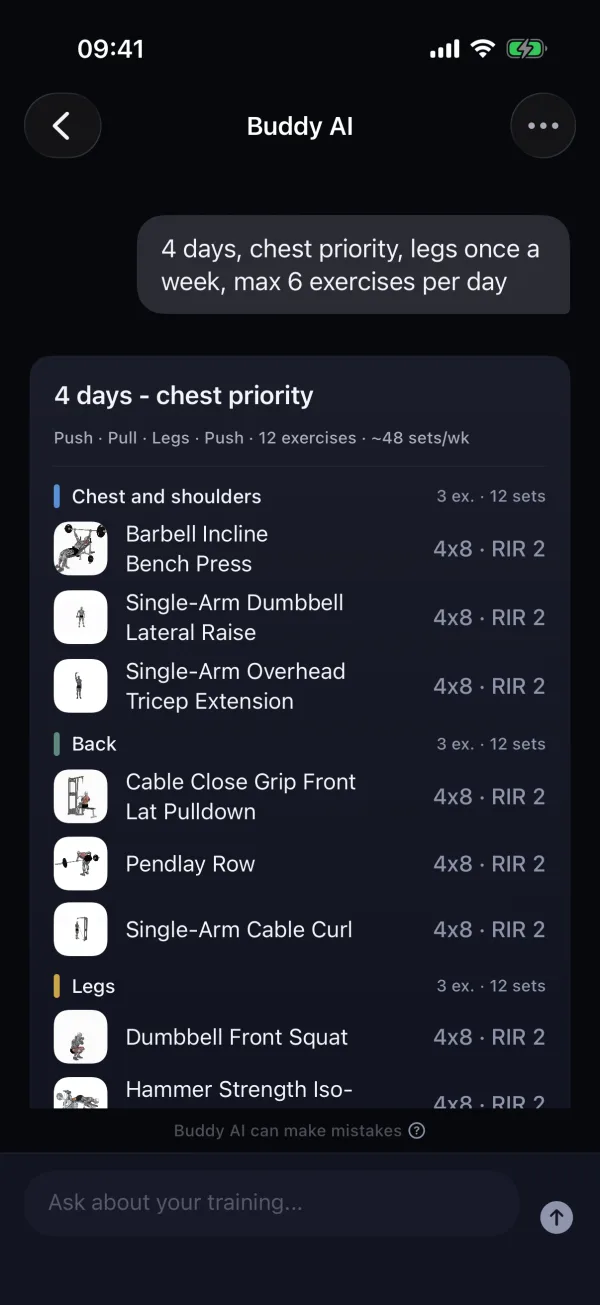
Describe in one sentence how many days you train and what matters to you, then refine the proposal until it fits.
“4 days, chest priority, legs once a week”
Change your plan in one sentence
An exercise, the sets or a whole day. Say it in plain language and Buddy lays out the changes for you to approve.
“Add squats, cut the shoulder volume and swap the french press”
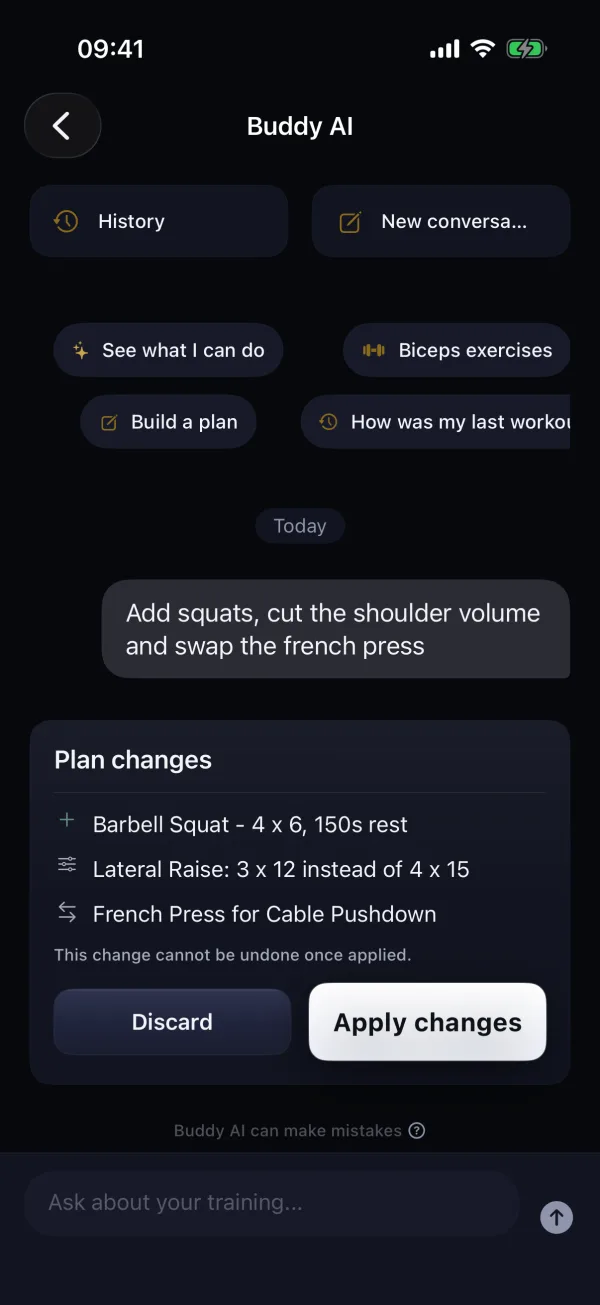
You approve every proposal yourself - nothing changes without you.
Buddy does not advise on pain, injury or health - that is for a physiotherapist or a doctor.
FEATURES
What actually makes a difference in Pully.
Ask about your training
Buddy AI reads your workouts and plan, so it talks with your own numbers. Build a plan with it or change one in a single sentence - you approve every change.
Your plan, no workarounds
Multi-week plans, days, targets, rest periods, and exercises with variants. Run PPL, Full Body, Upper/Lower or your own split without hacking around app limitations.
Logging that doesn't slow you down
Auto-fill from your last session, fast set logging, RIR at hand, rest timer and barbell calculator when you need them. Less phone. More training.
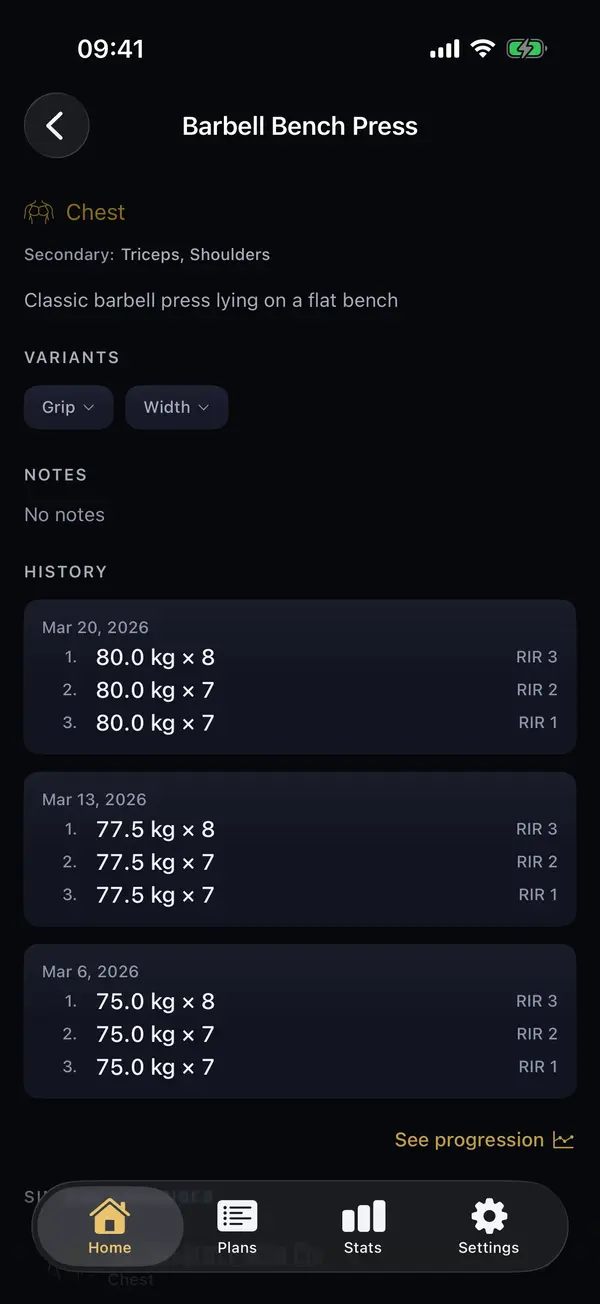
350+ exercises. Form on hand.
An animation and step-by-step instructions for every exercise, in English and Polish. And grip matters: every variant keeps its own history and suggestions from your last session.
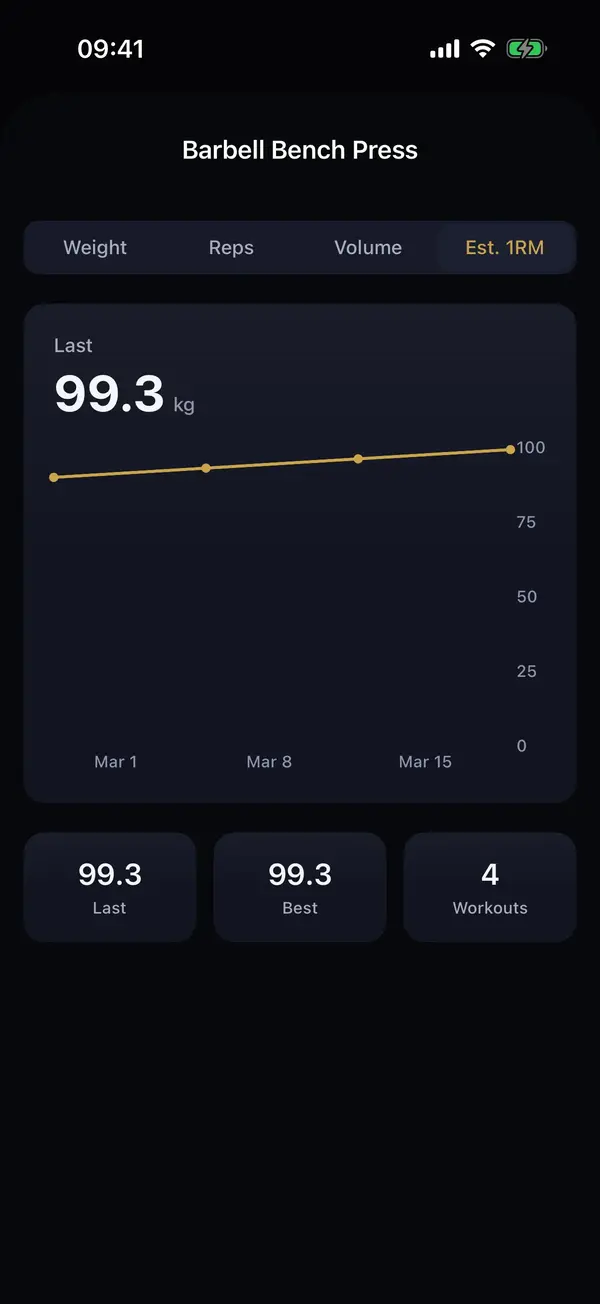
Numbers that help you decide
Progression charts, muscle map, radar and a monthly report. Week over week you see whether your plan actually works.
Templates alongside plans
A library of ready-made plans and templates: PPL, Full Body, Upper/Lower. Start in 30 seconds, edit it your way - up to 8 templates free.
Your data, your control
CSV and JSON export is always free. Your data is yours.
Tools built for the gym
RIR, exercise history, swaps, borrow from another day, reorder, notes, unfinished workout recovery, quick start from plan or quick workout. Everything so the app supports a real session, not just looks good in screenshots.
Stats
Your data starts working for you.
What you used to count by hand in a spreadsheet, Pully shows on its own - clear and instant.
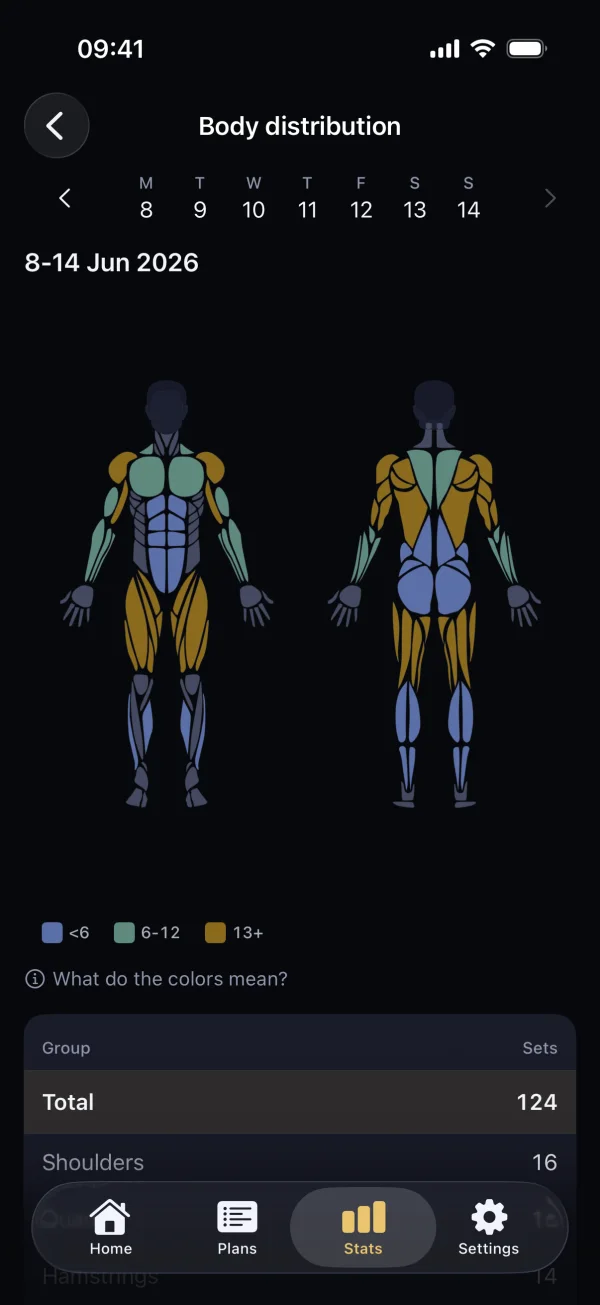
Train your whole body, not just favorites.
Weekly training distribution on a body map. Colors show which muscles get work and which are waiting.
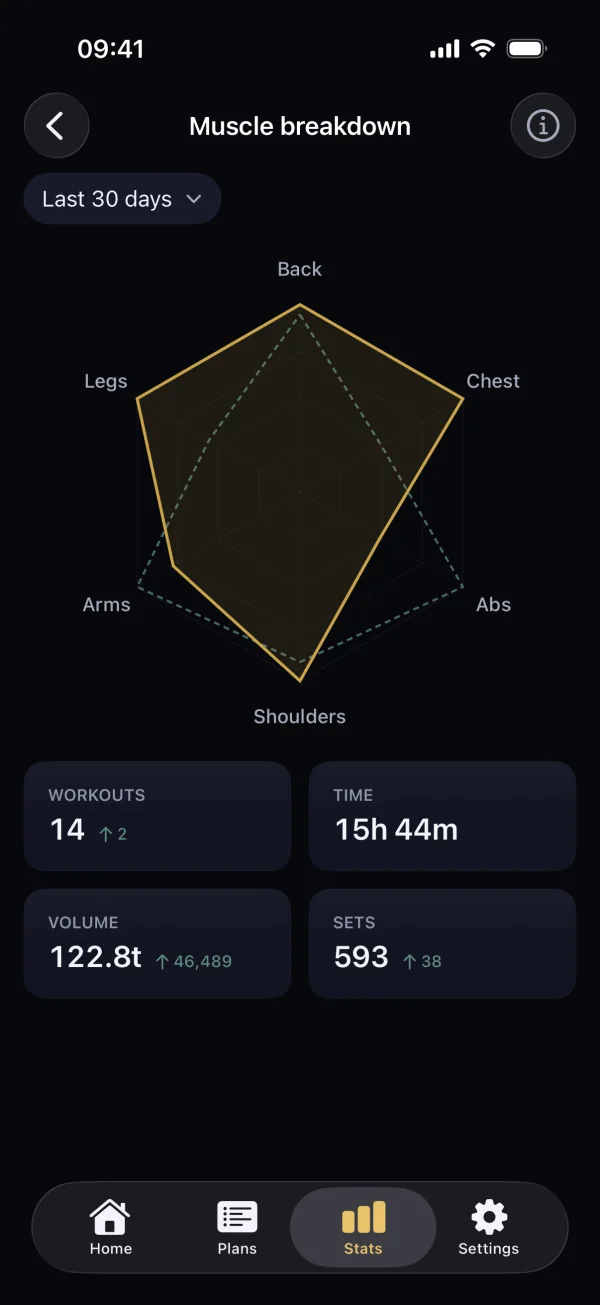
Muscle balance at a glance.
A radar compares the current period with the previous one: back, chest, core, shoulders, arms, legs.
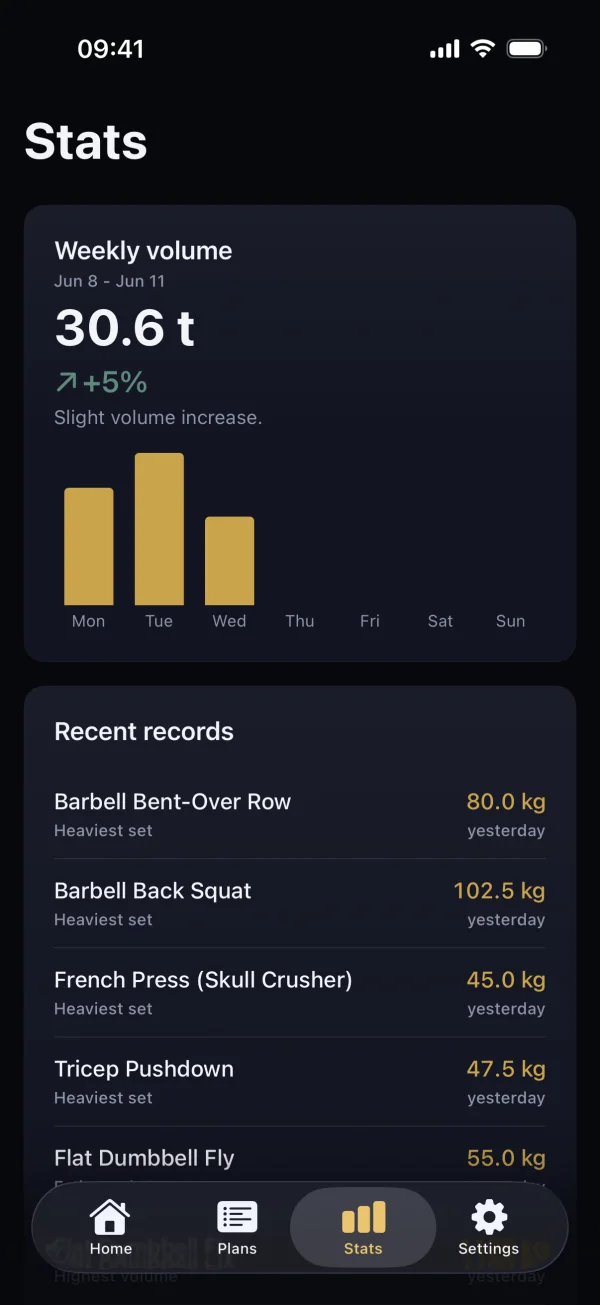
Was this week better?
Weekly volume with a trend and a plain-language verdict, with fresh records right below.
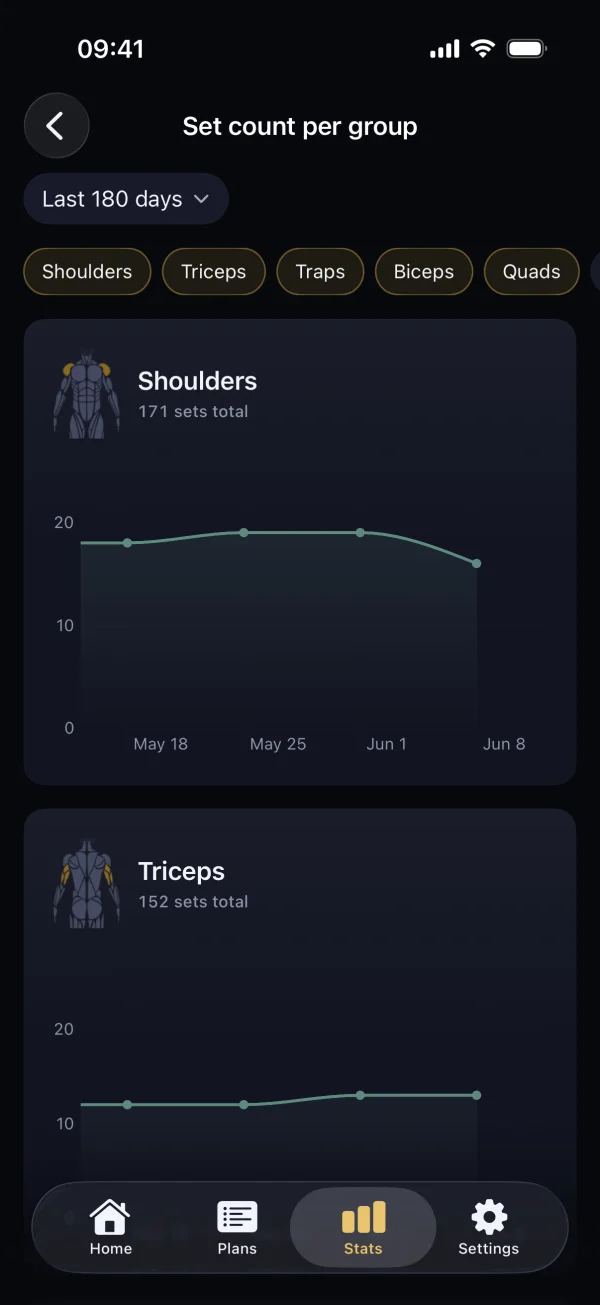
Sets for every muscle group.
How many weekly sets each muscle group gets - with a trend up to 180 days back.
Logging and the 350+ exercise library are free.
Download and start with your plan. You'll see the rest after a few workouts.
Free download
A training log that keeps up with your plan.
I built Pully because I was running PPL in a spreadsheet. It worked - until I wanted to check whether I was actually progressing on specific exercises. Scrolling through dozens of weeks isn't analysis. It's just manually searching for answers the app should have right away. I wanted a tool that helps me run my plan at the gym and organizes data after training. No social bloat, no giving up control, no pretending to be a coach.
2
taps per set
350+
exercises with animations and instructions
CSV/JSON
export always free
Designed for real training.
Works offline.
You can log workouts even without signal. Data saves locally and syncs when you're back online. Buddy AI needs an internet connection.
Zero social noise.
No feed, no followers, no likes. You open the app, do your workout, close it.
Core is free.
Logging, one active plan, plan archive, templates, timer, barbell calculator, export, and sync are all free.
Your data is yours.
You can export workouts to CSV or JSON at any time. Export is always free.
FREE
Start for free. Stay as long as you like.
Unlimited workout logging, the full 350+ exercise library with animations, ready-made plans and templates, a rest timer and a barbell calculator - all free. Your data is yours: CSV and JSON export always free, offline logging, plans and stats, and no lock-in when you want to leave.
Frequently asked questions
What is Buddy AI?+
Buddy AI is a training partner built into the Pully iPhone app. It reads your logged workouts and plan to answer with your own data, not generic advice. Ask how your last session went, request a plan in one sentence, or change an exercise, the sets or a whole day. Buddy prepares a proposal and you approve it - nothing changes without you. It does not advise on pain, injury or health. Talking to Buddy AI needs an internet connection.
Can Buddy AI build me a training plan?+
Yes. Describe in one sentence how many days a week you train and what matters to you, for example “4 days, chest priority, legs once a week”. Buddy proposes a plan with days, exercises and sets, and you refine it in conversation. The plan is saved only after you approve it. If you prefer, you can also build it yourself, day by day.
What does Buddy AI do with my data?+
When you send a message, we transmit a summary of your training, your active plan's name and structure, your profile preferences and the message you type to our AI sub-processor - never your email, body measurements, body weight, payment data or workout notes. The sub-processor does not use your prompts or replies to improve its products, and deleting a conversation or your account erases the conversation history from our systems, with exceptions described in the privacy policy.
Privacy Policy, section 2.8Can I run my own plan or 5/3/1, PPL, Upper/Lower?+
Yes. Pully is a gym tracker built for structured training plans. It supports multi-week plans with days, exercises, variants, targets, and rest periods. You build a new plan on one screen where you add days and exercises - that is how you set up PPL, 5/3/1, Upper/Lower, or a fully custom split with as many days as you need. Ready-made plans (PPL, Full Body, Upper/Lower) are in the library, and you can also build a plan in conversation with Buddy AI. Each exercise can have multiple variants (like overhand vs neutral grip), and Pully tracks weights separately per variant. Once your plan is set, you open it before every session and the app loads your workout with auto-filled weights from last time. You can also modify your plan between sessions - add exercises, swap days, adjust targets - without starting over.
Can I use Pully for free?+
Yes. For free you log workouts without limits, get the full library of 350+ exercises with animations, one active plan, up to 8 templates, a rest timer, a barbell calculator, the last 3 months of history and CSV and JSON export. That is everything you need to run your plan and log your training day to day.
Are templates separate from plans?+
Yes, templates and plans serve different purposes and work alongside each other. Templates are standalone workout sessions you can start anytime with one tap - useful for accessory work, cardio days, or workouts you do occasionally outside your main plan. Plans are structured across multiple weeks with specific days, exercises, progression targets, and variants. You can run a plan as the core of your training while keeping templates for everything else. For example, you might run a 4-day Upper/Lower plan but also have a template for your Sunday mobility session. Some people use only plans, others only templates, and many use both depending on the workout.
Does Pully work offline?+
Yes. Pully is built offline-first: all your data is stored locally on your device, so logging, plans, history and stats work even without any internet connection - in airplane mode or in a basement gym with no signal. The exception is Buddy AI - talking to it needs an internet connection. When you reconnect, Pully syncs your data to the cloud automatically in the background. This also means your workouts are never lost if the app crashes mid-session - Pully can recover unfinished workouts from local storage. Cloud sync is included free and works across your Apple devices.
Can I export all my data?+
Yes. You can export your entire workout history to CSV or JSON at any time, and this feature is always free. CSV works well for spreadsheets if you want to do your own analysis. JSON preserves the full data structure including exercise variants, plan metadata, and session details. The export includes every set, rep, weight, RIR value, and note you have ever logged. Your data is yours - Pully does not lock it away or make it difficult to leave. You can export as often as you want.
Is my data mine, and can I take it with me?+
Yes. Your workouts, plans, templates and everything you log belong to you. Nothing is deleted, your workouts are stored locally on your device, and CSV or JSON export is always free - you can take your full history and move it anywhere, anytime. Pully never makes it hard to leave.
How is Pully different from tracking in a spreadsheet?+
A spreadsheet can store numbers but cannot auto-fill your weights from the last session, run a rest timer in the background, compare this week's session to last week's side by side, track per-exercise progression with charts, or recover an unfinished workout if you accidentally close it. Pully takes the same data you would put in a spreadsheet and organizes it automatically. You still control your plan structure, exercises, and targets - but you spend less time managing cells and more time training. The biggest difference is progression insight: instead of scrolling through dozens of rows to see if you are getting stronger on a specific exercise, Pully shows you the trend immediately after each session.
Does Pully support progressive overload tracking?+
Yes. Progressive overload tracking is one of Pully's core strengths. After every workout, Pully compares your session to the same day from the previous week and highlights where you lifted more weight, did more reps, or improved your volume. It tracks personal records per exercise and flags new PRs automatically. Each exercise variant is tracked independently, so your neutral grip pull-down progress is separate from your overhand progress. Pully also shows progression charts - your strength curve over weeks and months - and volume trends, so you can see whether your training load is rising, holding, or falling.
Is there an Android version?+
iOS only for now. Android is on the long-term roadmap, but there is no timeline yet. Pully is built by a single developer and the focus is on making the iOS version as solid as possible before expanding to another platform.
Guides
Learn to train smarter.
Practical guides on progression, volume and planning your training.
How to track progressive overload
What to measure and how to read progress session to session.
How to calculate training volume
Sets, reps and tonnage - what actually drives progress.
How many sets per muscle per week
How many working sets each muscle group needs.
How to choose a workout split
PPL, Full Body or Upper/Lower - what fits you.
Workout app vs spreadsheet
Where a dedicated app saves time and gives better data.
How long to rest between sets
Rest times for strength, hypertrophy and endurance - and how to keep them.
How to break a training plateau
What to do when you stall - volume, a deload and a fresh stimulus.
1RM calculator
Estimate your one-rep max from any working set.
What is Pully?
Pully is a free workout logging app for iPhone - a gym tracker and training plan builder in one. Build your plan the way you actually train: PPL, Full Body, Upper/Lower or a custom split with days, exercises, variants, targets and rest periods. Log sets in 2 taps with weights auto-filled from your last session, a rest timer and a barbell calculator on hand. Buddy AI is the training partner in Pully that reads your workouts and helps you build or change your plan.
The library of 350+ exercises with animations and step-by-step instructions, in English and Polish, is free. You log for free without limits, with weekly volume, basic records and CSV and JSON export always free. Logging, plans and stats work offline, and the app replaces your spreadsheet, notebook and timer.